# Popup Form

## Overview

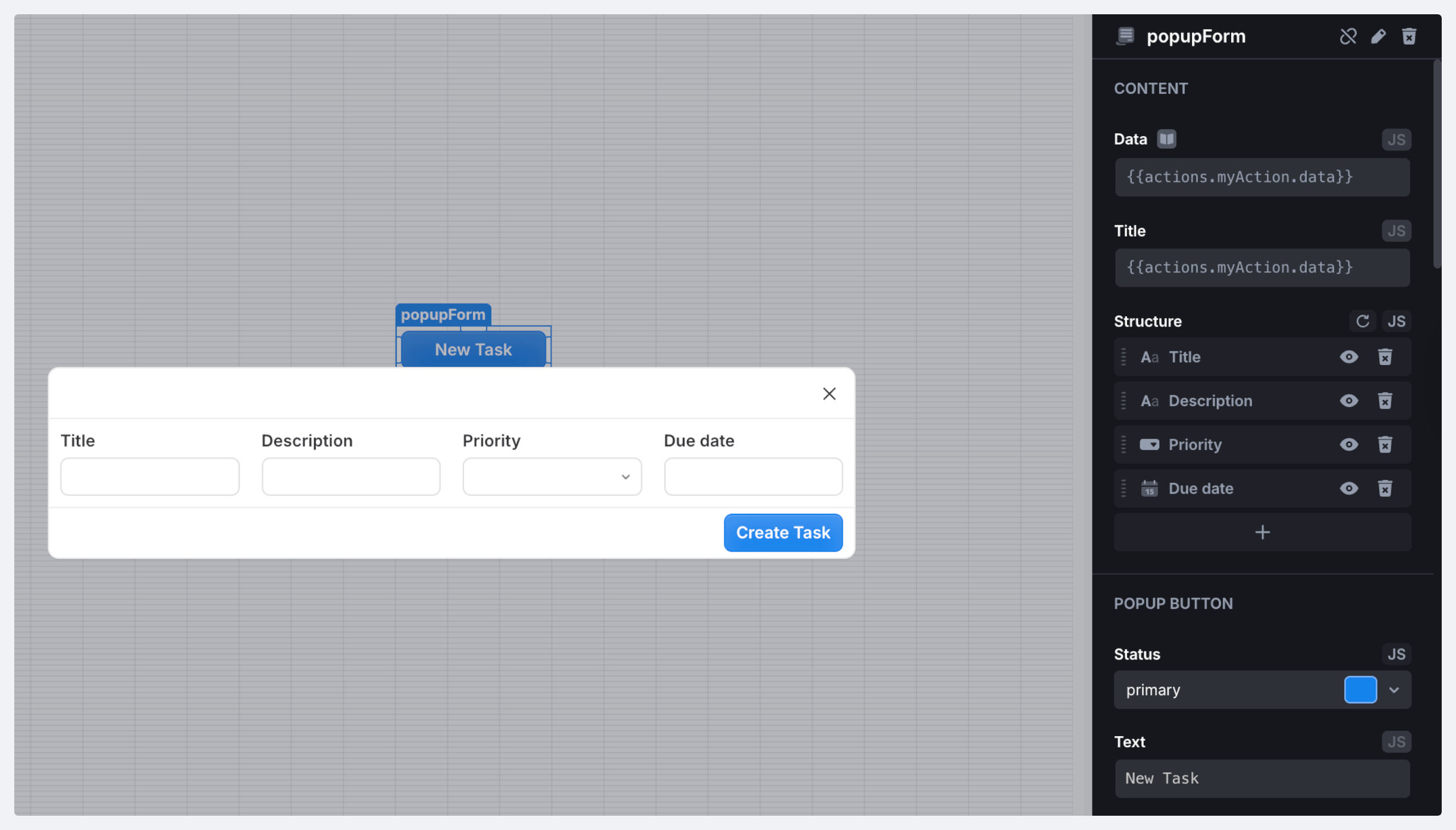
A popup form is a type of form that appears as a small overlay on top of the content triggered by a user action such as clicking a button.

<figure><img src="https://837703843-files.gitbook.io/~/files/v0/b/gitbook-x-prod.appspot.com/o/spaces%2FUX6zPRMFFK0yrTghj7cY%2Fuploads%2FaFELvVm3jvaWzfbK00Bs%2FCleanShot%202025-08-20%20at%2013.19.29%402x-min.png?alt=media&#x26;token=d569d057-3d16-4d4a-92c6-b9ad1ce30e48" alt=""><figcaption></figcaption></figure>

### Properties

<table><thead><tr><th width="141.4921875">Name</th><th width="115.83203125">Type</th><th>Description</th></tr></thead><tbody><tr><td><code>name</code></td><td><code>string</code></td><td>Component name</td></tr><tr><td><code>value</code></td><td><code>object</code></td><td>Key value object</td></tr><tr><td><code>valid</code></td><td><code>boolean</code></td><td>Indicates if the component is valid</td></tr><tr><td><code>validating</code></td><td><code>boolean</code></td><td>Indicates if the component is validating</td></tr></tbody></table>

### Methods

<table><thead><tr><th width="222.11328125">Name</th><th width="151.1484375">Parameters</th><th width="103.84765625">Returns</th><th>Description</th></tr></thead><tbody><tr><td><code>open</code></td><td>–</td><td><code>void</code></td><td>Open modal window</td></tr><tr><td><code>close</code></td><td>–</td><td><code>void</code></td><td>Close modal window</td></tr><tr><td><code>setValue</code></td><td><code>data: object</code></td><td><code>void</code></td><td>Set component data. Data is an object with arbitrary structure. </td></tr><tr><td><code>setSubmitButtonDisabled</code></td><td><p><code>disabled:</code> <br><br></p><p><code>boolean</code></p></td><td><code>void</code></td><td>Disable or enable the submit button</td></tr><tr><td><code>reset</code></td><td>–</td><td><code>void</code></td><td>Reset component to the initial value</td></tr><tr><td><code>validate</code></td><td>–</td><td><code>void</code></td><td>Trigger form validation</td></tr><tr><td><code>resetValidation</code></td><td>–</td><td><code>void</code></td><td>Clear validation errors</td></tr><tr><td><code>setErrors</code></td><td><p><code>errors: {</code> </p><p><code>[key: string]:</code> </p><p><code>string } | null</code></p></td><td><code>void</code></td><td>Mark the component as invalid and display errors</td></tr><tr><td><code>setOpenButtonDisabled</code></td><td><p><code>disabled:</code> </p><p><code>boolean</code></p></td><td><code>void</code></td><td>Disable or enable the open button</td></tr><tr><td><code>submit</code></td><td>–</td><td><code>void</code></td><td>Trigger submit event</td></tr></tbody></table>

### Triggers

<table><thead><tr><th width="214.3671875">Name</th><th>Description</th><th data-hidden></th></tr></thead><tbody><tr><td><strong>On Init</strong></td><td>Triggered when the component is initialized</td><td></td></tr><tr><td><strong>On Submit</strong></td><td>Triggered when the component data is submitted</td><td></td></tr><tr><td><strong>On Click</strong></td><td>Triggered when the component is clicked</td><td></td></tr><tr><td><strong>On Double Click</strong></td><td>Triggered when the component is double-clicked</td><td></td></tr><tr><td><strong>On Change</strong></td><td>Triggered when the component's state changes</td><td></td></tr><tr><td><strong>On Custom Button Click</strong></td><td>Triggered when the custom button is clicked</td><td></td></tr><tr><td><strong>On Custom Button Double Click</strong></td><td>Triggered when the custom button is double-clicked</td><td></td></tr><tr><td><strong>On Open</strong></td><td>Triggered when the component is opened</td><td></td></tr><tr><td><strong>On Close</strong></td><td>Triggered when the component is closed</td><td></td></tr></tbody></table>

## Working with the component

You can cuztomize the component using its settings in the right side panel. From there, you can, for example:

* *Hide the component*

If necessary, you can hide the popup button to save space and open or close the form programmatically by selecting the **Hide button** checkbox.

<figure><img src="https://837703843-files.gitbook.io/~/files/v0/b/gitbook-x-prod.appspot.com/o/spaces%2FUX6zPRMFFK0yrTghj7cY%2Fuploads%2F3GTk7mW3XLhibzYBDrAX%2FCleanShot%202025-08-20%20at%2013.20.48%402x-min.png?alt=media&#x26;token=69ff8627-6acf-4ad3-844a-90d11ddec82a" alt=""><figcaption></figcaption></figure>

* *Add a custom button to the form*

By default, the component contains only a single *Submit* button. But you can also add a custom button to the form and customize it using the **Show custom button** setting.

<figure><img src="https://837703843-files.gitbook.io/~/files/v0/b/gitbook-x-prod.appspot.com/o/spaces%2FUX6zPRMFFK0yrTghj7cY%2Fuploads%2FoTbxVXUOT1hNVsCL4bQr%2FCleanShot%202025-08-20%20at%2013.24.38%402x-min.png?alt=media&#x26;token=556b936c-6b9e-4aa6-a8bf-94b3c847d117" alt=""><figcaption></figcaption></figure>

{% hint style="info" %}
The Popup Form also supports [CSS styling](https://docs.uibakery.io/how-tos/styling/modify-components-with-css).
{% endhint %}

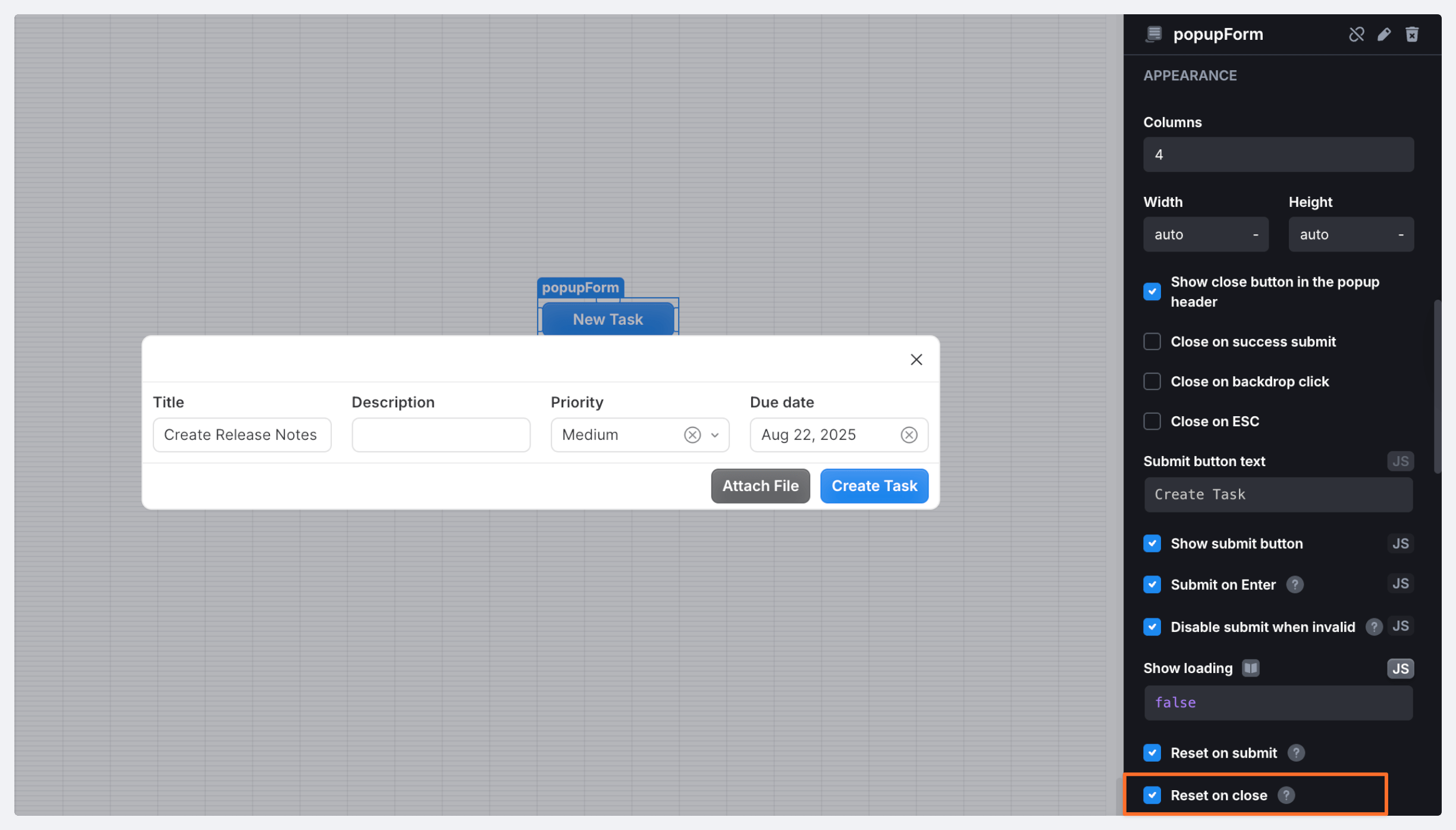
* *Reset the form on close*

By default, the component resets its content on submission but retains it if the form is closed. But, if required, you can modify this behaviour using the **Reset on close** setting.

<figure><img src="https://837703843-files.gitbook.io/~/files/v0/b/gitbook-x-prod.appspot.com/o/spaces%2FUX6zPRMFFK0yrTghj7cY%2Fuploads%2FY89MUts6IDVQrawSPSNK%2FCleanShot%202025-08-20%20at%2013.29.40%402x-min.png?alt=media&#x26;token=0fa2d418-f8d4-4794-b518-657d51644f95" alt=""><figcaption></figcaption></figure>